

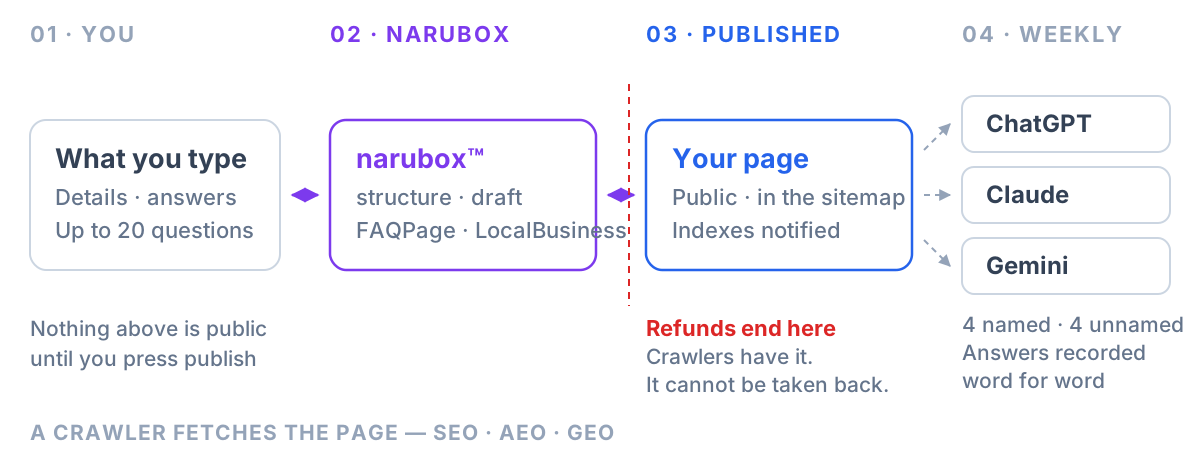
Four screens, and the third one is the only irreversible thing in the product. You describe the business, answer the questions customers ask, publish, and then read what the assistants said. Everything else is detail.
- Seven questions arrive already written. None of them are compulsory.
- The sheet holds twenty. Ours only occupy a slot once you answer them, so you can ignore all seven and write twenty of your own.
- Nothing is public until you press Publish — that one button is also where a refund stops being available.
- Each week we ask eight questions of three assistants: four naming you, four not.
- The four that do not name you are the ones you type yourself — asked word for word.
- The first check runs two to eight days after signup, then every seven.
The same four screens, in order. It starts muted — press the speaker for sound.
Screen one — what the business is
Name, trade, city, address, phone, opening hours, and a description in your own words. Typed in. There is no file to find and nothing to prepare.
Three of these do more than they look like they do. The trade decides which questions we ask on your behalf — a dentist and a plumber get different ones. The city is what makes a question local, and without it there is no "near me" to be part of. The description becomes the page's opening paragraph and the description field in its markup, which is the single line an assistant is most likely to quote back.
The logo is the only file, because it is the only thing that ends up on the page as a picture — the mark at the top, the social preview, and the image in the structured data.
Screen two — the questions
This is the part that does the work, and the part people skim.
An assistant can only repeat what your page answers. So the set of questions on this sheet is, quite literally, the set of things it will be able to say about you — and the ones you leave off are the ones it will answer from somewhere else.
Seven arrive written: what you are, where, when you open, what you sell, what it costs, your refund policy, and how to book. They are a starting point, not an allocation. Skip any that do not fit — a blank is simply not published — and the slot stays yours.
The thirteen remaining are the valuable ones. We can guess what a salon gets asked. We cannot guess that you are asked about wheelchair parking every week, and that is exactly the question with no competing answer on the internet.
Screen three — publish
One button, and the only step here that cannot be undone.
Your page goes live at narubox.com/your-business carrying schema.org FAQPage and LocalBusiness markup — so a machine reading it knows which sentence answers which question instead of inferring. It enters the sitemap, it is listed in our public directory, and the search indexes are notified through IndexNow rather than left to find it.
That notification matters more than it sounds. A page nothing links to is a page no crawler fetches: ours sat in a sitemap for weeks with zero fetches until a single link was added. The directory is that link.
The button is where the refund line sits, and the confirmation says so. Publishing submits your page to search and AI indexes, and what they have retrieved cannot be withdrawn by us — so up to that click everything is refundable, and after it, nothing is. Writing answers does not cross it. They stay private until you press it.
Screen four — what they actually said
Every week, eight questions to ChatGPT, Claude and Gemini.
Four use your name — the test of whether you are described correctly. Four leave it out, which is the harder test: an assistant handed your name will almost always say something, while an unprompted recommendation is one you either come up in or you do not.
The four without your name are yours to write
This is the box at the top of the answers screen, and it is the one thing in the product we cannot work out for you.
We used to build those four from your business category, and it was wrong in a way that took a while to see. A category is how a business describes itself. It is almost never the words a customer uses. Our own category here reads "GEO AI Index Software company" — so every week we were asking three assistants for the best GEO AI index software company in Austin, a sentence no human being has ever typed. Anyone who knew that phrase already knew the category existed.
What a customer actually types is the problem they have: how do I get my business to show up in ChatGPT. So the box asks for that, up to four lines, and we ask them word for word. No rewriting — a phrase wrapped in a template stops being a sentence anyone would say. Leave lines blank and we fall back to the category guess for those.
The four with your name rotate
The first is fixed: what your business is and what it does. That is the baseline, and a baseline that moved every week would not be one — every report stays comparable to the last on that question.
The other three advance through your published answers a week at a time and wrap around. Same four questions, same weekly cost, but a twenty-answer sheet gets checked in full inside two months instead of the same three questions forever.
You get each answer word for word, with the date, whether you were named, and which competitors came up instead. Not a score. A number out of a hundred is easy to render and impossible to argue with, which is exactly what is wrong with it — a sentence tells you what to change.
The page in between
There is a fifth screen that is not a step. It shows the whole chain as a diagram — your details, the page, the crawlers, the assistants — with the parts that are actually running lit up and the parts that are not sitting still.
It also lists which crawlers have fetched your page and when. That is the step nobody else shows you, and the one everything depends on: we publish, we notify, and then a crawler either comes or it does not. Before it does, none of this has reached anyone.
What is not there
No keyword tool, no rank tracker, no content calendar, no dashboard of invented scores.
And no promise of placement. There is no ranking to buy — an assistant composes a fresh answer each time it is asked, so anyone selling you a position in one is selling something that does not exist. What the four screens do is make sure that when an assistant reaches for something to say about your business, what it finds is accurate, current, and yours.
Common questions
How long does setting it up take?
Under an hour for most businesses, and it does not have to be done in one sitting. The details screen is a few minutes. The answers are the part worth spending time on, and you can save and come back — nothing is published until you decide it is.
Do I have to answer all twenty questions?
No. Publishing needs one answer. A blank question is simply left off the page rather than published empty. That said, a question you leave off is one an assistant will answer from somewhere else, so the blanks are not neutral.
Can I change an answer after publishing?
Yes, any time and as often as you like. Edits are live as soon as you save, and the search indexes are notified automatically that the page changed — the same notification the first publish sends. A business that hesitates to correct its own prices ends up with assistants quoting last year's.
What happens between publishing and the first check?
Crawlers come and read the page. The first check runs two to eight days after signup — the date is fixed to your account rather than shared, so a busy signup week does not put every business on one morning. The exact date is shown on your dashboard and on the report.
What if I do not know what my customers type?
Leave the box blank and we build the four questions from your business category, which works but is a guess. The better route is to write down the last three things a customer said on the phone before they booked. That is the phrase, in their words rather than your industry's, and you can change it any time.
Is the page mine if I stop paying?
The answers you wrote are yours and can be exported or deleted at any time. The published page is part of the subscription. Cancelling is self-service from the dashboard, takes effect at the end of the month already paid for, and everything keeps running until then.
- schema.org FAQPage and LocalBusiness — the markup the published page carries
- IndexNow — the protocol used to notify search indexes of a change
- Google Search Central — Sitemaps, on sitemaps supplementing rather than replacing link discovery
The counts in this article — seven starter questions, twenty on the sheet, eight asked weekly, two to eight days to the first check — describe narubox as it runs today and are read from the running product rather than from a plan. narubox is not affiliated with OpenAI, Anthropic or Google.