
NaruBase™
NaruBase™ Probe
쉬운 말로 설명하는 네트워크 진단
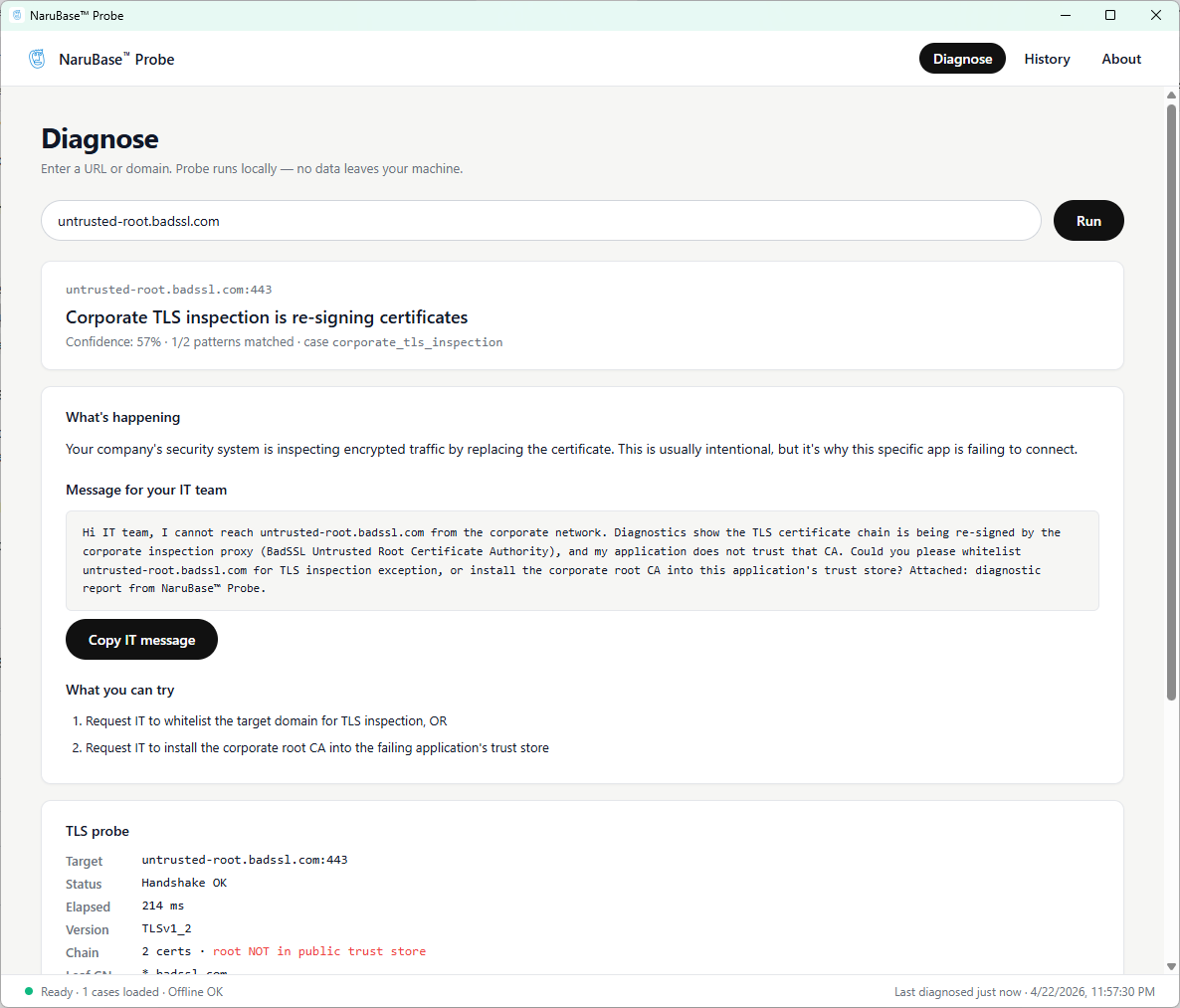
NaruBase™ Probe는 비기술 사용자를 위한 Windows 기반 네트워크 진단 도구입니다. 안 되는 URL을 붙여넣으면 사용자 기기에서 DNS·TLS 검사를 실행해 회사 인증서 검사·잘못된 DNS 같은 근본 원인을 짚어 주고, IT에 그대로 전달할 수 있는 자연어 진단 결과를 만듭니다.
GitHub Releases에서 최신 빌드를 다운로드하세요. 설치 후 7일간 무료로 체험하고, 라이선스를 입력해 계속 사용하실 수 있습니다. 설치 중 Windows SmartScreen 경고가 뜰 수 있습니다 — "추가 정보" 클릭 후 "실행"을 누르면 계속 진행됩니다. 소규모 배포자에게 흔한 정상적인 현상이며 파일에는 문제가 없습니다.
1. 무엇을 하나요
Probe는 사용자 기기에서 입력한 URL에 대해 표준 DNS 및 TLS 진단을 실행합니다. 이름 해석 체인을 따라가며 오리진이 제시한 인증서를 검사하고, 이를 본인 기기의 신뢰 저장소와 비교합니다. 회사 보안 에이전트가 끼워 넣은 MITM 인증서, 잘못된 CDN 엣지로 향하는 DNS 레코드, 만료된 중간 인증서 등 문제가 보일 때, 결과는 원시 스택 트레이스가 아닌 자연어 설명으로 제공됩니다.
2. IT 핑퐁을 줄여 줍니다
모든 진단은 IT 지원 티켓 형식으로 자동 정리됩니다. 첫 단락은 사용자가 본 현상, 둘째 단락은 기술적 증거, 셋째 단락은 권장 다음 조치입니다. 다국어 생성도 가능해 글로벌 지원 데스크에서도 활용할 수 있습니다. 3차에 걸친 핑퐁 대화를 한 번의 명확한 티켓으로 줄이는 것이 목표입니다.
3. 로컬에서, 감사 가능, 오프라인 라이선스
Probe는 전적으로 사용자 기기에서 실행됩니다. 외부 호출이 없고, URL이나 인증서를 업로드하지 않으며, 계정도 필요하지 않습니다. 라이선스 활성화는 오프라인입니다 — 서명된 라이선스 키를 한 번 붙여넣으면 이후 외부 통신 없이 작동합니다. 진단 룰셋은 감사 가능합니다 — 각 룰이 무엇을 검사하고 왜 발화되는지 모두 확인할 수 있습니다.
4. 가격과 라이선스
사용자당 1회 $39, 7일 무료 체험. 기업 팀 라이선스도 제공됩니다 — 견적은 문의해 주세요. 현재 Windows 지원이며, macOS·Linux는 로드맵에 있습니다.
7일 무료 체험. 구독 없음, 정기 결제 없음.
자주 묻는 질문
Probe를 쓰려면 IT 지식이 필요한가요?+
아니요. Probe는 DNS/TLS 진단 결과를 쉬운 말과 IT 티켓 초안으로 변환해줘서, 결과를 이해하기 위해 기술적인 지식이 필요하지 않습니다.
Probe가 제 URL이나 인증서를 어딘가로 전송하나요?+
아니요. 모든 진단은 본인 기기에서 로컬로 실행되며, 저희에게 업로드되지 않습니다.
회사 VPN이나 프록시 뒤에서도 진단할 수 있나요?+
네 — Probe는 사용자 기기에서 직접 검사를 실행하므로, 회사 프록시나 MITM 인증서 검사를 포함해 실제 네트워크 경로가 보는 것과 동일하게 확인합니다.
설치할 때 Windows에서 보안 경고가 뜨는데 정상인가요?+
네, 정상입니다. Windows SmartScreen은 아직 설치 건수 기반 평판이 쌓이지 않은 소규모 배포자의 설치 파일에는 항상 경고를 띄웁니다 — 파일에 문제가 있다는 뜻이 아닙니다. "추가 정보"를 클릭한 뒤 "실행"을 누르시면 설치가 계속됩니다.